For decades, road safety experts have focused on external Car’s Technology. We have been warned about the dangers of texting while driving, the peril of reaching for a dropped French fry, and the risks of intense conversations with passengers. But as we navigate the automotive landscape of 2026, a new and more insidious threat has emerged: the car itself.
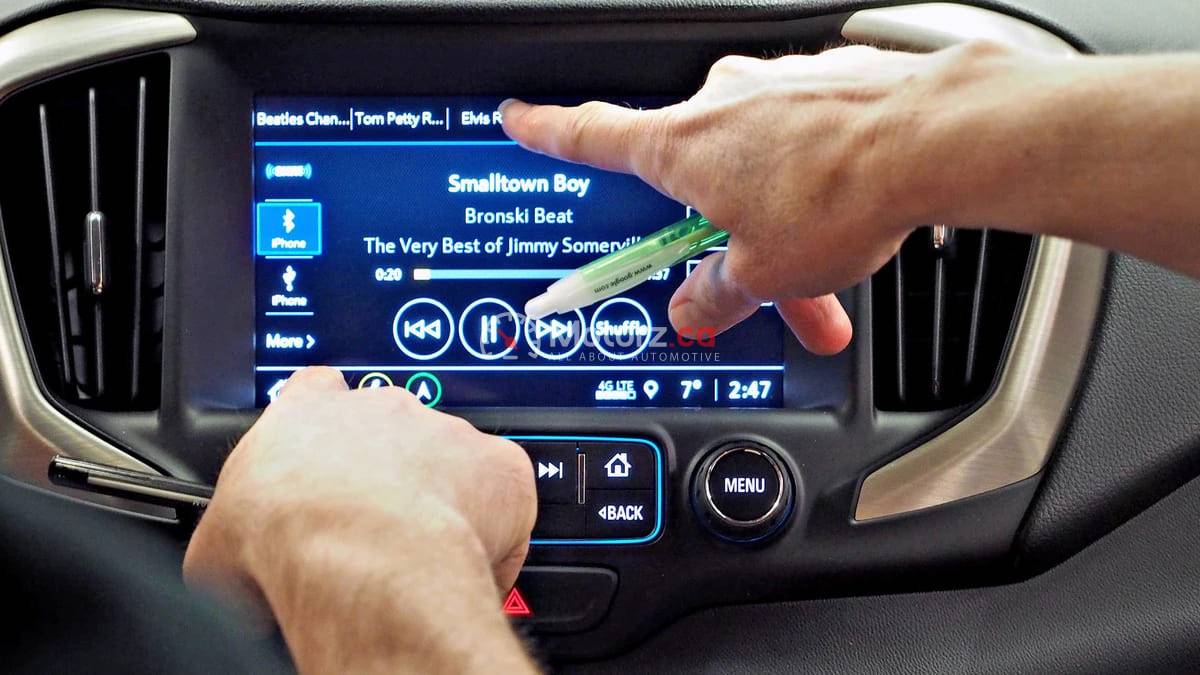
Modern vehicles have transformed from simple mechanical tools into rolling supercomputers. While the intention behind massive touchscreens, haptic feedback, and gesture controls was to make our lives easier, the reality for many drivers is a confusing, glowing maze of menus. When you have to tap a screen three times just to adjust the fan speed or find the defrost setting, the interface isn’t helping you—it’s distracting you.
In this deep dive, we explore the “Lorraine Complains” perspective on modern cabin ergonomics. We will look at why physical buttons are disappearing, the safety risks of “screen-heavy” interiors, and how you can reclaim focus in an increasingly noisy cockpit.
The Death of the Button: Why Manufacturers are Car’s Technology
If you sit in a premium vehicle from 2026, you might road safety something startling: there are almost no physical knobs or switches. The volume knob has been replaced by a slider; the climate controls are buried in a sub-menu; even the glovebox release might be a digital button on a screen.
The Cost of Innovation
The move toward all-screen interiors isn’t just about aesthetics; it is about manufacturing efficiency. It is significantly cheaper for an automaker to program a function into a software interface than it is to design, manufacture, and wire a physical switch. By moving everything to a central “tablet,” manufacturers can update features over-the-air, but they often do so at the expense of the driver’s muscle memory.
The Loss of Tactile Feedback
The beauty of a physical dial is that you can operate it without looking. You can feel the “click” of a temperature knob or the ridge of a volume dial while keeping your eyes on the road. Touchscreens provide no such feedback. To ensure you have pressed the right digital button, your eyes must leave the windshield and focus on the screen—even if only for a second. At 100 km/h, that second of distraction means you have traveled nearly 28 meters while essentially blind.
Notification Overload: The “Smartphone on Wheels” Problem
Modern cars are designed to keep us connected, but that connectivity comes with a constant stream of interruptions. From lane-departure pings to “Safety Score” notifications and incoming calendar invites, the dashboard has become a rival for our attention.
Alert Fatigue
When a car pings for everything—a car in your blind spot, a low tire pressure warning, and a text message notification all at once—the driver can experience “alert fatigue.” This is a psychological state where the brain begins to tune out all warnings because there are simply too many. When a genuine emergency occurs, the driver may not react in time because they have been conditioned to ignore the car’s constant “chatter.”
Infotainment Complexity
In 2026, many vehicles feature integrated apps like YouTube, Zoom, and high-end gaming suites. While these are intended for use while parked or charging (in the case of EVs), the temptation to “just check one thing” while in slow-moving traffic is immense. The boundary between a vehicle’s primary job—transportation—and its secondary job—entertainment—has become dangerously blurred.
The Ergonomic “Corner Wrench”: Designing for Humans, Not Computers
Safety organizations are starting to push back against the “everything on a screen” trend. The Euro NCAP (New Car Assessment Programme) has even begun suggesting that cars must have physical controls for basic functions like turn signals, wipers, and horns to receive a five-star safety rating.
The 12:00 O’Clock Rule
A well-designed car should allow a driver to perform any “vital” task without moving their hand more than a few inches from the steering wheel. This includes adjusting the mirrors, clearing a foggy windshield, and changing the audio volume. When these tasks are moved to a center-mounted touchscreen, the driver’s posture shifts, their eyes move away from the horizon, and their reaction time slows.
Voice Control: A Double-Edged Sword
Manufacturers often argue that voice commands solve the distraction problem. “Just tell the car what you want,” they say. However, voice recognition in 2026 is still not perfect. Dealing with a computer that doesn’t understand your accent or fails to recognize a command in a noisy cabin creates a different kind of distraction: cognitive frustration. A frustrated driver is an unsafe driver.
How to Minimize In-Car Distractions: 3 Practical Tips
While you might not be able to change the design of your car’s dashboard, you can change how you interact with it.
Set It Before You Shift: Make it a “Corner Wrench” rule to set your navigation, select your playlist, and adjust your climate control before you take the car out of Park. If you need to make a change mid-trip, wait for a red light or pull over.
Customize Your Shortcuts: Most modern infotainment systems (like Ford’s SYNC 4 or Tesla’s v12 software) allow you to pin “shortcut” buttons to the bottom of the screen. Put your most-used features—like the defroster or the 360-degree camera—where they are easiest to reach.
Use “Do Not Disturb” Modes: Many cars now have a “Driving Mode” that mirrors your smartphone. This will silence non-essential notifications and keep your dashboard focused on the task of driving rather than the task of socializing.
The Future of Interaction: Heads-Up Displays and Beyond
As we look toward 2027 and 2028, the industry is searching for a middle ground. The next generation of “Heads-Up Displays” (HUDs) aims to project vital information directly onto the windshield, allowing drivers to see navigation and speed without ever looking down.
Augmented Reality (AR) Navigation
AR HUDs can overlay blue arrows onto the actual road in front of you, showing exactly where to turn. This reduces the cognitive load of looking at a 2D map on a screen and trying to translate it to a 3D world.
Haptic Steering Wheels
Another emerging tech involves steering wheels that vibrate on the left or right side to tell you which way to turn or to warn you of a lane departure. This uses the sense of touch rather than sight or sound, keeping the “visual” channel clear for the road.
Keeping the Drive in Driving
The car should be an extension of the driver, not a competitor for their attention. While the massive screens and high-tech features of 2026 are impressive, they must be secondary to the primary goal of road safety. We must demand that manufacturers prioritize intuitive, tactile controls for the functions that matter most.
Next time you are in the market for a vehicle, don’t just look at the screen size—look at how easy it is to use while you are actually driving. Safety isn’t just about how a car handles a crash; it’s about how well it helps the driver avoid one in the first place.